leads-vs-deals
Leads
In the early stages of your lead generation process, you may find yourself with potential deals sitting in the early stages of your pipeline. They’re not ready to move forward through the sales process and aren’t cold enough to be lost or deleted.
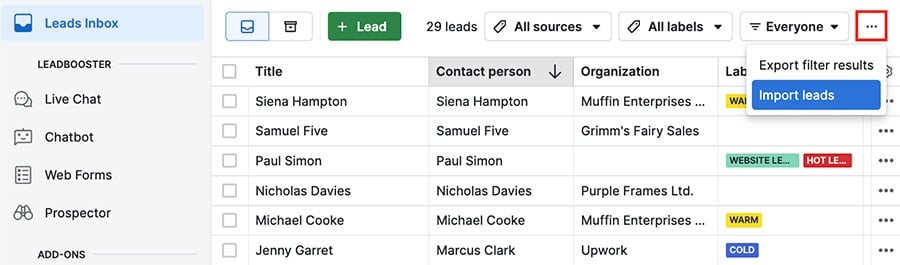
That’s why our Leads Inbox is a separate inbox to keep your prequalified leads in before they become deals.

Once you decide which leads should be qualified, you can easily convert them to deals and add them directly into your pipeline to start your sales process.

- Leads can be linked with a person, an organization or both.
- Leads can be used to organize your potential clients before moving them to your sales pipeline.
- Leads can be imported into your account.
Deals
In Pipedrive, the ongoing transaction you’re pursuing with a person or organization is tracked as a deal, and is processed through the stages of your pipeline until it’s either WON or LOST.

Clicking on a deal opens its detail view, where you can see any linked contacts, products, projects or activities.

Leads vs. deals
The differences between leads and deals are important for understanding how each can best serve your sales process.
| Feature | Leads | Deals |
| Link to projects and products | No | Yes |
| Create documents and upload files | No | Yes |
| Can be created through Leadbooster tools | Yes | No |
| Can be archived | Yes | No |
| Invoicing | No | Yes |
| Formula fields | No | Yes |
| Participants | No | Yes |
| Goes in a pipeline/stage | No | Yes |
Converting leads to deals
List view
When you have qualified leads ready to be pursued as deals in your pipeline, select them in the list view and click “Convert to deals.”
Hit ”Convert” to confirm your choice, and the leads will be deleted and replaced by deals in the specified pipeline.